DMX Lighting Scanners: Setup, Programming, and Live Event Use Guide
Lighting has the power to transform an ordinary space into something unforgettable. Whether it’s a high-energy concert, a wedding reception, a nightclub, or a corporate event, dynamic lighting creates atmosphere, emotion, and rhythm. Among the many tools used by lighting professionals, scanners remain a favorite for their speed, precision, and ability to deliver sharp, moving beams.
If you’re stepping into the world of stage lighting or upgrading your current setup, understanding how to properly configure and use scanners can make all the difference. This guide walks you through everything—from the basics of DMX control to advanced programming techniques and real-world event use.
What Are Lighting Scanners?
Lighting scanners are intelligent lighting fixtures that use mirrors to redirect beams of light. Instead of moving the entire head (like moving head lights), scanners move a mirror quickly to project light in different directions. This results in extremely fast movement and crisp beam effects.
They are particularly useful in environments where speed and sharp transitions matter. Nightclubs, DJs, and small-to-medium event setups often rely heavily on scanners for this reason.
Scanners typically include features such as:
- Color wheels
- Gobos (patterns)
- Shutter and strobe effects
- Pan and tilt via mirror movement
They are efficient, compact, and often more affordable compared to moving head fixtures.
Understanding DMX Control
Before diving deeper, you need to understand the backbone of modern lighting systems: DMX.
DMX (Digital Multiplex) is a communication protocol that allows lighting controllers to communicate with fixtures. It sends signals over a cable to control various parameters like color, movement, brightness, and effects.
A single DMX universe supports up to 512 channels. Each lighting fixture uses a certain number of these channels depending on its complexity.
For example:
- A basic scanner might use 6–8 channels
- Advanced scanners may use 12–16 channels
Each function—like color, gobo, or movement—gets assigned to a specific channel.
Why Choose Scanners Over Other Fixtures?
Lighting scanners offer unique advantages that make them ideal in certain situations. They are not always better than moving heads, but in the right context, they shine—literally.
Here’s why many professionals still prefer them:
- Speed: Mirror movement is faster than moving an entire head
- Sharp beams: Great for defined patterns and aerial effects
- Compact size: Easy to transport and install
- Cost-effective: Budget-friendly compared to moving heads
That said, they do have limitations. Their movement range is more restricted, and they are less versatile for wide coverage. Still, for focused lighting effects, scanners are incredibly effective.
Getting Started with DMX Lighting Scanners
Now let’s talk about the real thing—DMX Lighting Scanners. Setting them up properly is the first step toward unlocking their full potential.
To begin, you’ll need the following equipment:
- DMX controller (hardware or software)
- DMX cables (XLR cables)
- Power supply
- Lighting fixtures (your scanners)
Step 1: Daisy Chain the Fixtures
Connect your DMX controller to the first scanner using a DMX cable. Then connect the output of the first scanner to the input of the next one, and so on. This is called a daisy chain.
Step 2: Assign DMX Addresses
Each scanner must have a unique starting address so the controller knows which fixture to control.
For example:
- Scanner 1: Address 001
- Scanner 2: Address 009 (if 8-channel fixture)
- Scanner 3: Address 017
This prevents overlapping signals.
Step 3: Terminate the Chain
At the end of your DMX chain, use a DMX terminator to prevent signal reflection and interference. This small step can save you from unpredictable behavior during live shows.
Programming Your Scanners
Once your setup is complete, it’s time to bring your lighting to life.
Programming involves creating scenes, chases, and effects using your DMX controller.
Static Scenes
These are fixed looks:
- Specific color
- Defined gobo
- Set position
Perfect for ambient lighting or slower parts of an event.
Chases
Chases are sequences of scenes played in order. For example:
- Scanner 1 → left
- Scanner 2 → center
- Scanner 3 → right
Then loop.
This creates motion and energy.
Sound-Activated Mode
Many scanners include built-in microphones that react to music. While convenient, this mode can be unpredictable. It’s useful for beginners but not ideal for professional setups.
Manual Control
Advanced users often prefer manual control using faders and buttons. This allows real-time adjustments during performances, giving more flexibility.
Understanding Channels and Functions
Each scanner comes with a channel chart. This chart tells you what each DMX channel controls.
Typical channel assignments include:
- Pan (mirror movement horizontally)
- Tilt (vertical movement)
- Color wheel
- Gobo selection
- Gobo rotation
- Shutter/strobe
- Dimmer
Learning how to read and use this chart is essential. It may seem technical at first, but once you understand it, programming becomes much easier.
Positioning Scanners for Maximum Impact
Where you place your scanners matters just as much as how you program them.
Common Placement Options:
- Truss-mounted (overhead): Ideal for concerts and stage performances
- Floor-mounted: Creates dramatic upward beams
- Side placement: Adds depth and dimension
Tips for Better Coverage:
- Avoid pointing beams directly into people’s eyes
- Use haze or fog machines to enhance beam visibility
- Ensure even spacing for balanced effects
Positioning can make or break your lighting design. Even basic programming can look stunning with the right placement.
Live Event Applications
Scanners are widely used across different types of events. Let’s explore how they fit into various scenarios.
Concerts and Music Events
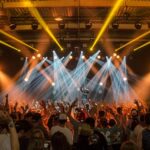
Fast movement and synchronized effects are key. Scanners can follow beats, create sweeps, and highlight performers.
Weddings
Here, subtlety matters. Soft gobos, slow movements, and warm colors create elegance rather than intensity.
Nightclubs
This is where scanners truly shine. Rapid motion, strobes, and vibrant colors keep the energy high all night.
Corporate Events
Clean, professional looks are preferred. Use scanners for logo projection or gentle movement across walls and ceilings.
Advanced Programming Techniques
Once you’re comfortable with the basics, you can level up your lighting game.
Layering Effects
Combine movement, color changes, and gobo rotation simultaneously. This creates richer visuals.
Timing and BPM Sync
Match your lighting effects to the tempo of the music. Many controllers allow BPM (beats per minute) syncing.
Grouping Fixtures
Control multiple scanners as one unit. This simplifies programming and ensures uniform movement.
Use of Presets
Save frequently used scenes and effects. This saves time during live performances.
Troubleshooting Common Issues
Even experienced users run into problems. Here are some common issues and how to fix them.
Lights Not Responding
- Check DMX cables
- Verify addresses
- Ensure controller output is active
Flickering Lights
- Use a DMX terminator
- Replace faulty cables
- Avoid signal interference
Incorrect Movement
- Double-check channel assignments
- Ensure correct fixture profile in controller
Troubleshooting is part of the learning process. Over time, you’ll get faster at diagnosing issues.
Safety Considerations
Lighting equipment involves electricity, heat, and moving parts. Safety should always come first.
- Secure fixtures properly when mounting
- Avoid overloading power circuits
- Keep cables organized to prevent tripping
- Allow fixtures to cool before handling
A safe setup ensures smooth operation and peace of mind during events.
Choosing the Right Controller
Your DMX controller is the brain of your setup.
Types of Controllers:
- Hardware controllers: Physical consoles with faders and buttons
- Software controllers: Apps running on laptops or tablets
Beginners may find software easier due to visual interfaces. Professionals often prefer hardware for reliability and tactile control.
Maintenance and Care
To keep your scanners performing at their best:
- Clean lenses and mirrors regularly
- Check cables and connectors
- Store equipment in dry, dust-free environments
- Perform routine testing before events
Proper maintenance extends the life of your equipment and ensures consistent performance.
Final Thoughts
Lighting is both a science and an art. It requires technical knowledge, but also creativity and intuition. DMX lighting scanners sit right at the intersection of these two worlds.
At first, the setup and programming may feel overwhelming. Channels, addresses, cables—it’s a lot to take in. But with practice, it becomes second nature. You start to think less about the technical steps and more about the visual story you want to create.
And that’s when the real magic happens.
Whether you’re lighting a small party or a large-scale production, scanners give you the tools to create movement, energy, and emotion. Learn the fundamentals, experiment with effects, and don’t be afraid to make mistakes.
Because in lighting, as in any creative field, mastery comes not from perfection—but from practice.