Audio Mixers Explained: Types, Features & Buying Guide
Sound is invisible, yet it shapes emotion, clarity, and impact in ways few other elements can. Whether you are producing a podcast, running live sound at a concert, recording a band in a studio, streaming gameplay, or managing audio for a corporate event, the audio mixer is the nerve center of your entire signal chain. It is the control hub. The sculpting tool. The place where raw sound becomes refined communication.
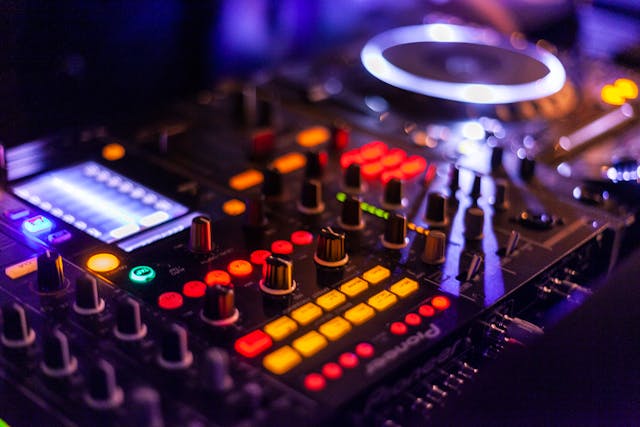
An audio mixer, sometimes referred to as a mixing console or soundboard, combines multiple audio signals, adjusts their levels, shapes their tonal balance, and routes them to outputs such as speakers, recorders, or broadcasting systems. At its core, it manages gain structure, equalization, panning, and signal routing. Yet modern mixers go far beyond that. They integrate digital signal processing (DSP), multi-track recording, wireless control, and network audio protocols that redefine flexibility.
Choosing the right mixer, however, is not a trivial decision. The wrong console can limit scalability, introduce noise, complicate workflow, and ultimately compromise performance. The right one enhances precision, accelerates workflow, and ensures consistent sonic results.
If you are planning to Buy Professional Audio Mixers in USA, understanding the various types, features, and technical considerations becomes essential. Price alone should never dictate the decision. Instead, your selection must align with application, environment, input requirements, processing expectations, and future expansion.
Let us break it down methodically.
What Is an Audio Mixer?
An audio mixer is an electronic device that accepts multiple input signals—microphones, instruments, playback devices—and blends them into a controlled output signal. The process involves several stages:
- Input stage – Where microphones and line-level sources enter the system.
- Preamp stage – Boosts low-level mic signals to usable line level.
- Equalization (EQ) – Shapes frequency content.
- Auxiliary sends – Routes signals to monitors or effects.
- Fader control – Adjusts overall level.
- Output routing – Sends the final mix to speakers or recording devices.
In live environments, mixers control house sound and monitor mixes simultaneously. In studio settings, they manage recording levels and routing. In broadcasting, they ensure clean voice reproduction and consistent loudness.
The evolution from analog to digital consoles has radically expanded control possibilities. Today’s mixers integrate advanced processing engines and automation capabilities that were once available only in large-format consoles.
Main Types of Audio Mixers
The market broadly categorizes mixers into analog, digital, powered, and software-based models. Each type serves distinct operational demands.
1. Analog Mixers
Analog mixers process audio signals in continuous electrical form. They are intuitive, tactile, and reliable. Each function typically has a dedicated physical knob or fader, making real-time adjustments straightforward.
Advantages:
- Simple signal path
- Low latency
- Immediate hands-on control
- Generally affordable
Limitations:
- Limited onboard effects
- No recallable presets
- Larger footprint for higher channel counts
Analog consoles are common in small venues, rehearsal spaces, churches, and entry-level studios.
2. Digital Mixers
Digital mixers convert audio into digital data for processing. They offer advanced features such as built-in effects, scene recall, dynamic processing, and remote control via tablets or computers.
Leading brands like Yamaha and Behringer have popularized compact digital consoles with professional capabilities.
Advantages:
- Preset recall and automation
- Integrated compressors, gates, and reverbs
- Smaller physical footprint
- Flexible routing
- Multi-track USB recording
Limitations:
- Learning curve
- Slight latency (though negligible in modern units)
- Higher upfront cost
Digital mixers dominate live touring, houses of worship, broadcast environments, and modern studios.
3. Powered Mixers
A powered mixer combines a mixing console and a power amplifier in one unit. These are commonly used in small PA systems.
Advantages:
- All-in-one solution
- Portable
- Simplified setup
Limitations:
- Limited scalability
- Not ideal for large venues
They are practical for solo performers, small bands, and event hosts.
4. Software and Virtual Mixers
Software-based mixers operate within digital audio workstations (DAWs) or streaming platforms. They rely on audio interfaces for input conversion.
Streaming-focused mixers like those from Roland integrate hardware controls with software processing for content creators.
These mixers are ideal for podcasters, YouTubers, and remote broadcasters.
Key Components and Features Explained
Understanding specifications prevents overspending and ensures compatibility.
1. Channels
Each channel accepts one input source. Consider:
- Number of microphones
- Instruments
- Playback devices
- Future expansion
Small mixers may offer 4–8 channels. Professional consoles exceed 32 or 64 channels.
2. Microphone Preamps
The preamp amplifies weak mic signals. Quality preamps minimize noise and preserve tonal integrity. High-end mixers feature low-noise, high-headroom preamps.
3. Equalization (EQ)
EQ adjusts frequencies. Common configurations include:
- 2-band EQ (basic)
- 3-band EQ with sweepable midrange
- 4-band fully parametric EQ
Parametric EQ allows precision shaping—critical in professional live sound and recording.
4. Auxiliary Sends (Aux Sends)
Aux sends route signals to:
- Monitor speakers
- External effects processors
- In-ear monitor systems
More aux sends equal greater flexibility.
5. Effects and DSP
Digital mixers often include:
- Reverb
- Delay
- Compression
- Noise gates
- Feedback suppression
Brands like Allen & Heath integrate high-quality DSP engines suitable for professional touring rigs.
6. Connectivity Options
Modern mixers may support:
- USB audio interface functionality
- Ethernet control
- Dante networking
- Bluetooth streaming
Compatibility with your workflow matters more than feature quantity.
Applications: Choosing Based on Use Case
Different scenarios demand different mixer characteristics.
Live Concerts
- High channel count
- Robust build quality
- Scene recall capability
- Multiple monitor mixes
Digital mixers are preferred.
Podcasting & Streaming
- Low-noise preamps
- USB connectivity
- Compact footprint
- Simple controls
Brands like Mackie produce compact mixers popular in content creation.
Studio Recording
- Transparent preamps
- Multi-track recording capability
- Advanced routing
- Integration with DAWs
Hybrid setups combining mixers and audio interfaces are common.
Houses of Worship
- Feedback suppression
- Scene recall for services
- Remote mixing via tablet
- Multiple aux outputs
Digital consoles are highly practical here.
Analog vs Digital: Which Should You Choose?
This decision depends on workflow preference and technical requirement.
| Feature | Analog | Digital |
| Ease of Use | Very intuitive | Moderate learning curve |
| Effects | External only | Built-in DSP |
| Preset Recall | No | Yes |
| Size | Larger for high channels | Compact |
| Cost | Lower entry | Higher entry |
If flexibility and recall matter, digital wins. If simplicity and immediacy are priorities, analog remains viable.
Budget Considerations
Pricing varies significantly:
- Entry-level mixers: $100–$400
- Mid-range digital consoles: $500–$1500
- Professional touring mixers: $2000+
Do not focus solely on price. Consider durability, brand reliability, warranty support, and resale value.
Build Quality and Durability
Touring environments demand metal chassis construction, reinforced faders, and protected connectors. Brands like Soundcraft are known for robust console construction.
Heat management and internal component quality directly impact lifespan.
Future-Proofing Your Investment
Audio systems evolve. Streaming integration, network audio protocols, and remote mixing are becoming standard. Purchasing a mixer with firmware update capability ensures longevity.
Ask:
- Does it support firmware updates?
- Can channels be expanded?
- Is it compatible with digital stage boxes?
Scalability prevents premature replacement.
Common Mistakes to Avoid
- Buying too few channels.
- Ignoring monitor mix requirements.
- Overlooking recording needs.
- Choosing complexity beyond skill level.
- Neglecting brand support reputation.
Strategic planning prevents expensive upgrades later.
Understanding Signal Flow
Signal flow knowledge transforms mixer usage from guesswork into precision.
The typical path:
Input → Preamp → EQ → Aux → Fader → Bus → Output
Understanding buses (subgroups) allows you to control multiple channels collectively. In live sound, grouping drums into one bus simplifies level adjustments.
Digital Mixing Innovations
Modern digital mixers offer:
- Touchscreen interfaces
- Motorized faders
- Wireless tablet control
- Automatic mixing algorithms
- AI-based feedback suppression
These innovations reduce setup time and enhance consistency.
Portability vs Permanence
Portable mixers are ideal for mobile DJs and touring musicians. Fixed-install consoles prioritize integration and rack-mount compatibility.
Consider:
- Weight
- Rack space
- Power requirements
- Transportation needs
Sound Quality Factors
Sound quality depends on:
- Preamp clarity
- Headroom
- Signal-to-noise ratio
- Converter quality (for digital mixers)
Higher dynamic range equals cleaner mixes.
Integration with PA Systems
Compatibility matters. Ensure:
- Output levels match amplifier sensitivity
- Balanced outputs are available
- Adequate routing options exist
Mismatch leads to distortion or weak signal output.
Maintenance and Care
Proper maintenance extends mixer life:
- Keep dust-free
- Avoid moisture exposure
- Use voltage stabilizers
- Perform firmware updates
Neglecting maintenance reduces reliability.
Final Buying Checklist
Before purchasing, confirm:
- Required channel count
- Type (analog/digital/powered)
- Built-in effects needed?
- USB recording necessary?
- Monitor mix requirements
- Portability constraints
- Budget ceiling
- Brand reliability
Conclusion
An audio mixer is not just a piece of hardware. It is the command center of your sound ecosystem. The correct choice empowers you to sculpt clarity, balance dynamics, and deliver consistent results across environments. The wrong choice restricts workflow and introduces avoidable compromises.
Evaluate your use case carefully. Study signal flow. Compare specifications beyond marketing language. Think about future expansion. Prioritize reliability.
Sound is technical, but it is also emotional. A well-chosen mixer ensures that emotion translates faithfully—whether in a packed venue, a recording studio, or a quiet home podcast setup.